.png)
A–E Grade Toggle Feature
The new A–E Grade Toggle gives schools the flexibility for School Administrators to switch on or off A–E grading within reports and views. This ensures your assessment and reporting display aligns with your school or system’s preferred approach - whether you use achievement standards, proficiency scales, or A–E grades.
In this article:
Accessing the A–E grade setting (for School Administrators)
- Navigate to the cog wheel, located near the top of the screen, on the right-hand side.
- Locate School Configuration (you will need to be a School Admin to see this drop down link)
-
Look for School Preferences - A-E grade result

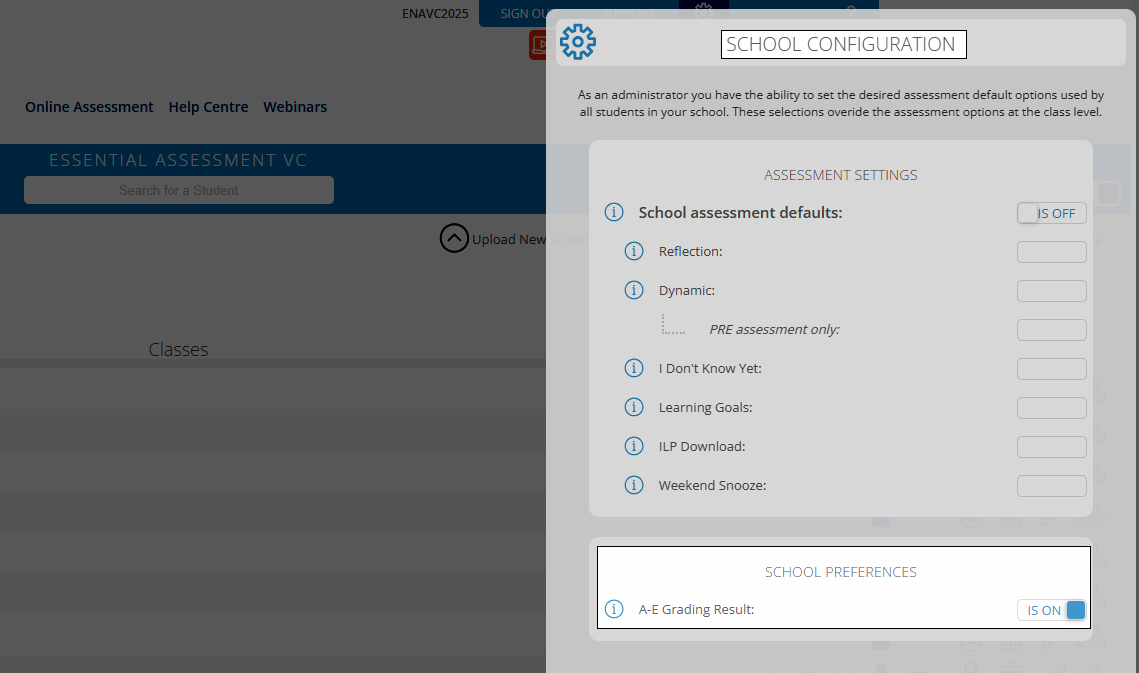
How to switch A–E grades ON or OFF
- To turn on A–E grades: slide the toggle ON to display letter grades (A–E) across reports
- To turn off A–E grades: slide the toggle OFF to hide letter grades
Your selection will apply automatically to all relevant reporting areas.
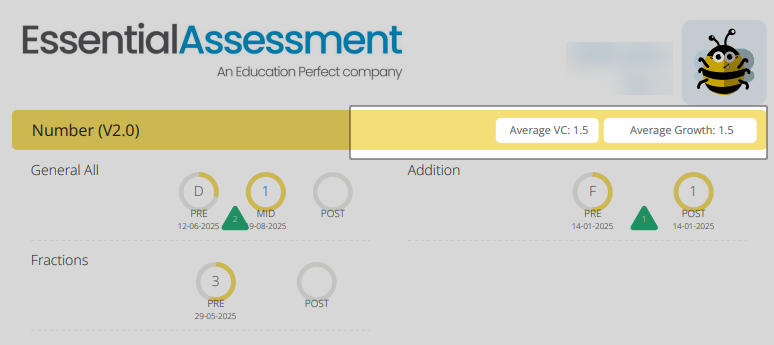
A report, before A-E grades toggle is turned on:
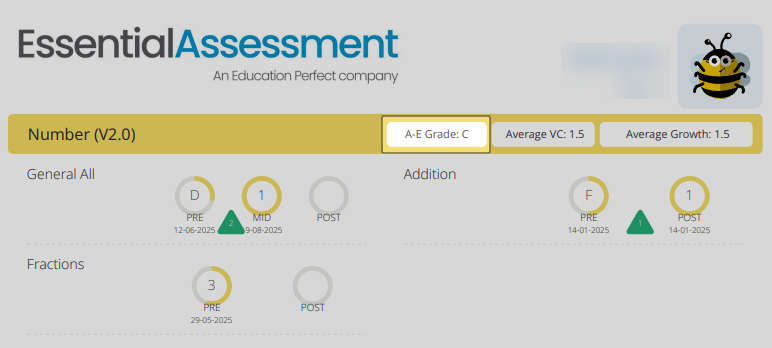
After:
Where the change appears
Once updated, the A–E display setting will affect:
- View Class Results
- Strand Overview
- Data wall
- Export Summaries
- Export Class Results Summary
- Export Data (Compass)
- Export Data (Sentral)
- Export Data (XLSX)
- Export Strand Overview (PDF)
Why this feature matters
The introduction of the A–E grade toggle reflects Essential Assessment’s commitment to supporting accurate, evidence-based reporting that empowers teachers’ professional judgment.
Historically, some educators have found the A–E grading display confusing or misleading. While the grades are designed to represent triangulated evidence across multiple sources, many users have unintentionally relied solely on Essential Assessment data to assign A–E grades, overlooking vital components such as classroom observations, student work samples, and rich assessment tasks. This over-reliance can distort the accuracy of reporting, reduce the value of teacher moderation, and obscure meaningful insights about growth, ZPD, and content descriptor-level understanding.
Furthermore, the A–E grades visible within Essential Assessment reflect performance at the assessed curriculum level, not the student’s year-level achievement standard. This can lead to confusion, as a Year 4 student working at a Year 6 level might appear to receive an “A”, even though state and national guidelines require that overall judgments be made against the expected year-level standard. Without clear context, these grades can be misinterpreted by both teachers and leaders, potentially leading to inconsistency across schools or systems.
By allowing schools to toggle A–E grading on or off, Essential Assessment now ensures greater alignment with diverse assessment and reporting frameworks across Australia. This flexibility supports schools that prefer to emphasise growth, mastery, and curriculum alignment rather than a single letter grade. It also respects jurisdictions where A–E reporting must follow rigorous professional standards:
- In Queensland, the QCAA requires that A–E grades be determined using Standard Elaborations, ensuring that every judgment reflects specific curriculum-aligned qualifiers and multiple forms of evidence.
- In South Australia, the Department for Education mandates that A–E grades provided to parents be based on teacher professional judgment against the Australian Curriculum achievement standards, supported by a range of evidence.
Enabling the A–E toggle empowers schools to comply with these principles, ensuring that reporting remains valid, contextual, and pedagogically sound. Teachers can maintain focus on content descriptor mastery, progress over time, and triangulated evidence, rather than on a simplified or potentially misleading grade.
Ultimately, this feature promotes data-informed decision-making, enhances assessment integrity, and reaffirms teachers as the key decision-makers in student reporting. It ensures that Essential Assessment continues to serve as a trusted partner in supporting professional judgment, curriculum fidelity, and clarity in communication with parents and school leaders.
Best practice tip
This feature is only available to School Administrators and once enabled should be explained to staff.
For more information on A-E grading, please see this help guide: Supporting Clarity and Consistency: NSW Level Expectations & A-E Grading